


Veeam Backup & Replication Security Best Practice Guide
Micro-Segmentation
Assume Breach starts from the premise that an attacker will eventually get in. Micro-segmentation is the control that decides how far they get once they do. In effect, it sets the blast radius of any single compromise.
In compare with having one large flat network, micro-segmentation divides the environment into small, tightly controlled zones, each with its own trust boundary. Where traditional segmentation separates “production” from “the internet”, micro-segmentation goes further: it separates production from backup, backup software from backup storage, and often one repository from another. A foothold anywhere then does not translate into free movement toward the systems that matter most.
For backup infrastructure this is one of the single most effective controls against ransomware. Most destructive campaigns depend on lateral movement: compromise an endpoint, escalate privileges, then pivot across the network until reaching domain controllers, file servers and, critically, the backup environment. Micro-segmentation is designed specifically to break that chain.
Why Flat Networks Are Dangerous for Backup Infrastructure
- Any compromised endpoint can potentially reach the backup server, proxies or repositories directly.
- A single set of compromised domain credentials may grant access across production and backup alike.
- Repositories reachable over the same network paths as everything else become just another target.
- There is no blast radius limit: one compromised workstation can escalate into a full ransomware event with no barriers in between.
A Zone Model for Veeam Data Platform
A zone is an area with a particular purpose, sensitivity and set of restrictions. Grouping systems by zone gives better visibility, reduces attack surface and lowers cost, because each zone is protected according to the value of what it holds. Systems subject to regulatory compliance can be grouped into subzones to limit audit scope.
Design rules to keep in mind:
- Secure by design.
- Know what is important to secure, and rank it.
- Know your attack vectors and the ways to close them.
- Apply least privilege.
- Weigh cost against benefit.
As a baseline rule, communication is only allowed between adjacent zones, and only over the ports and protocols the product actually requires.
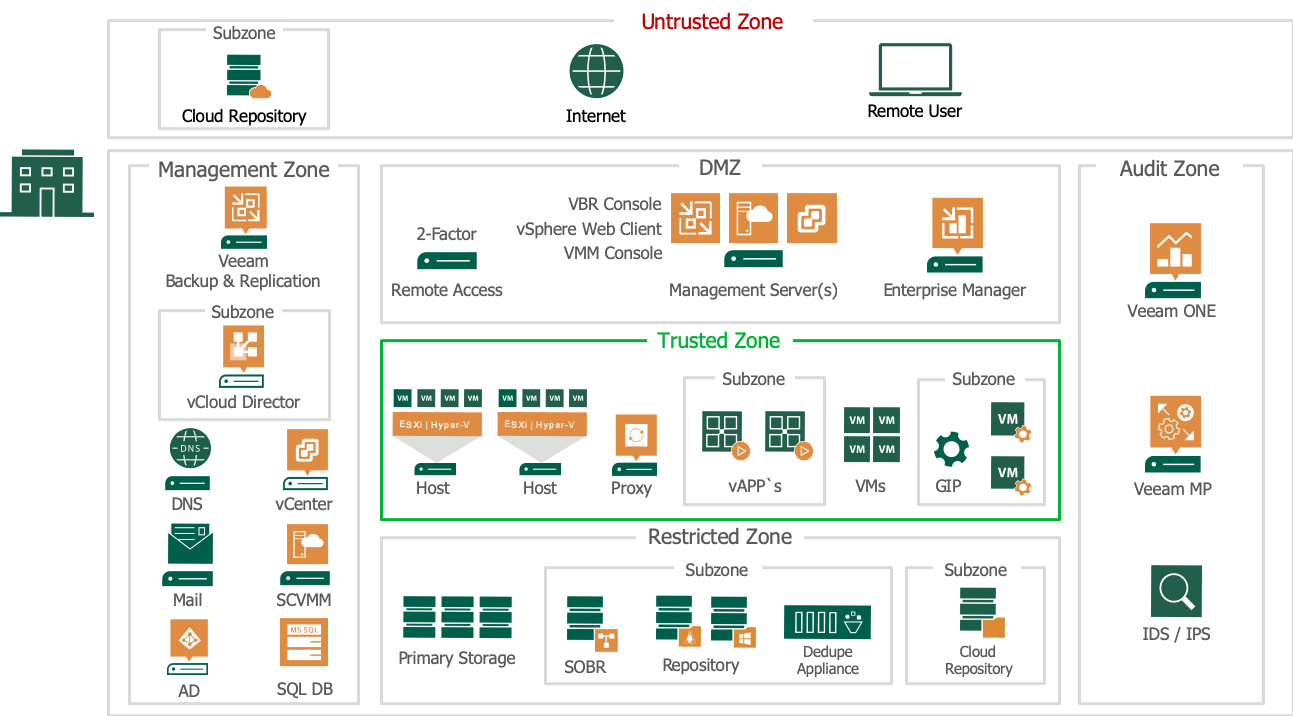
| Zone | What it holds | Segmentation intent |
|---|---|---|
| Untrusted | Anything outside your control: admin endpoints at home or on the road, the internet, service provider and public cloud targets. | No Veeam component is installed here. Remote administration is allowed only through an MFA-protected gateway or bastion, with drive, printer and clipboard redirection denied so nothing can be dropped in or copied out. |
| DMZ | Systems that must be exposed to the untrusted zone: remote access gateways, reverse/internet proxy, self-service portals. | Proxies access inward and funnels outbound traffic (licences, updates) through controlled paths. Hardened aggressively; holds no backup data. |
| Management | Backup server(s) (Veeam Software Appliance or Windows), the backup configuration database, the Host Management web UI, the backup Web UI and the Remote Console on a dedicated admin host, hypervisor management (vCenter, SCVMM), core services (DNS, AD, SMTP). | The management plane. Reachable only from a dedicated management VLAN or jump host. On the appliance, treat Host Management as a stricter subzone than backup management: separate port, separate role set, and the place where SSH and service-level changes are approved. Place the Remote Console close to the repositories it serves; file-level recovery can move hundreds of MB and performs poorly over high-latency links. |
| Trusted | Hypervisor hosts, backup proxies and other data movers, guest interaction proxies, production workloads (in subzones per business unit or tenant). | Data movers are scoped to only the sources and targets they need. Proxies can back up VMs without access to the guest OS; where guest processing is required, a guest interaction proxy inside the subzone limits the reach of that access. Data movers deployed as Veeam Infrastructure Appliances carry the same hardened image into this zone. |
| Restricted | Primary production storage and all backup repositories: hardened Linux repositories, SOBR, deduplication appliances, object storage, immutable and offline copies. | Never directly accessible to users. Reachable only from specific proxies and repository services, ideally not with production credentials. |
| Audit | Monitoring, SIEM, IDS/IPS and log collection. | Receives telemetry, and is not reachable from the zones it observes. If an attacker can reach a collector from a compromised zone, they can silence it and erase the record of how they got in. What this zone should be watching for is specified in Proactive Validation. |
Avoid overly complex designs. Subzones per tenant or business unit are useful. A model that nobody can operate, however, only creates a false sense of safety.
Best Practices
Separate Backup Components into Distinct Trust Zones
Design the backup architecture explicitly in terms of trust zones and draw the required communication paths before writing any firewall or IAM rule.
- Backup software, proxies and repositories are not one trust zone. Each sits in their own segment, with defined, minimal paths to the others.
- Make sure that the management plane is unreachable from general networks, proxies are scoped tightly to their sources and targets, and repositories are isolated further still
- No direct path from production systems, and not reachable with production credentials.
- Treat each cloud environment, and the on-premises estate, as its own segmented trust zone.
- Avoid shared identity providers or federated trust relationships that would let a compromise in one flatten the boundary into another.
Restrict Communication to What Is Strictly Necessary
Communication between zones follows a default-deny model.
- Only the specific ports and protocols documented as required for backup operations are permitted.
- Everything else is explicitly denied.
- Management interfaces (consoles, web UIs, APIs, remote administration) are restricted to known administrative segments, never exposed broadly.
- Veeam Backup & Replication’s network traffic rules apply this at the application layer: throttling and mandatory encryption can be scoped to a specific IP range, so traffic crossing a zone boundary (proxy to repository, backup server to a cloud target) carries its own policy, separate from the settings for the rest of the environment.
- The port surface has shrunk. v13 removed Microsoft RPC and WMI from component communication in favour of gRPC, and v13.1 moves backup traffic off the old 2500-3300 dynamic range onto a single port (6162). Re-derive firewall rules against the current port list and remove the legacy range. A default-deny model only works if the allow list is small enough to reason about.
Use Dedicated Management Networks and Identities
Administrative access to backup infrastructure should not travel the same paths as ordinary production or user traffic.
- Restrict backup management interfaces to a dedicated, monitored management VLAN or out-of-band network, reachable only from a small number of monitored jump hosts.
- Pair this with administrative accounts dedicated to backup infrastructure, distinct from general IT and domain admin accounts, so that a credential valid in production is not also valid across the Management boundary. Roles and scope are specified in Granular Roles.
- Those accounts must carry MFA and four-eyes approval, so that one compromised admin credential cannot unilaterally collapse the boundary between the Management and Restricted zones. This is the identity equivalent of the default-deny rule above. Both are specified in Least Privilege Access.
- On the appliance, SSH is disabled by default and enabling it requires Security Officer approval. Treat that setting as a segmentation control: an open shell on the backup server is a path across the Management boundary that no firewall rule will surface.
Ensure Bidirectional Isolation
Segmentation must hold in both directions. Compromise of production should not provide a path into the backup environment, and compromise of a backup component should not provide a path back into production. Proxies and agents often need elevated access to production systems to do their job; that access should be scoped and monitored so it cannot be reused as a pivot.
Veeam Recovery Orchestrator enforces this on the way back from a restore: where a restore point is flagged, the plan either halts or brings the machine up with no network connection at all (or into a quarantine network for cloud plans), so a possibly infected restore is never reconnected to production. The isolation is the segmentation control; the scanning that flags the restore point is specified in Threat Detection.
Treat the Air Gap as Segmentation Taken to Its Extreme
Every technique above still leaves a controlled network path, however narrow. An air gap removes the path entirely for at least one copy of the data. An attacker cannot misconfigure, phish or exploit their way across a connection that simply isn’t there. Air gap is a mechanism that makes that copy genuinely unreachable.
Where a physically disconnected gap isn’t practical, the closest equivalent is deliberately time-boxed connectivity, opened only long enough to transfer data and fully disconnected the rest of the time.
Another option is to route the offline copy to Veeam Data Cloud Vault or another Veeam-managed target that sits architecturally outside your own network and cloud tenants. Such a target is unreachable from inside any single environment an attacker may already hold, which provides a logical air gap.
Other Recommendations
- Use Veeam Recovery Orchestrator’s isolated recovery and testing locations (DataLabs), built on Veeam Backup & Replication’s Virtual Lab (a router/proxy appliance that creates an isolated network), so restore testing never requires connectivity into production.
- Periodically review and test the boundaries themselves: that no path exists between non-adjacent zones, and that production credentials are not accepted anywhere in the Restricted zone. Defense in Depth sets out how to design that test; detecting drift between tests is covered in Proactive Validation.
- Data crossing a zone boundary, especially data leaving your security perimeter toward a cloud or service provider repository, should be encrypted in transit and at rest; see End-to-End Encryption.
Important: there is no silver bullet. Security is a state of mind, maintained daily. Following a list of best practices and concluding you are secure is itself a risk. Design for your organisation’s needs, weighing budget, realistic attack vectors and the damage a breach would actually cause.
References
- NIST Special Publication 800-207, Zero Trust Architecture: https://www.nist.gov/publications/zero-trust-architecture
- CISA, Zero Trust Maturity Model: https://www.cisa.gov/zero-trust-maturity-model
- Veeam Community, Veeam Recovery Orchestrator v13 (isolated recovery/testing locations): https://community.veeam.com/product-updates/veeam-recovery-orchestrator-v13-12109