


Veeam Backup & Replication Security Best Practice Guide
Workgroup or Domain
A data protection system should never depend on the environment it is meant to protect. If Veeam is joined to the production domain, a domain compromise takes down your ability to recover from it too - the same domain controllers backup server authentication and name resolution rely on may be encrypted or unreachable during the incident you need them for.
This is not theoretical: backup infrastructure is typically an attacker’s first target after a domain compromise, not an afterthought. Deleting or encrypting backups before touching production removes the victim’s ability to recover without paying. A Veeam deployment joined to the domain it protects is easier to find and easier to hit.
Why Not the Production Domain
Production domains hold the largest number of accounts and the largest attack surface for phishing and social engineering. An attacker who reaches administrative privileges there and finds Veeam joined to it gets direct access to every backup, plus full visibility into the environment’s topology - including where every backup copy lives, offsite copies included. That intelligence lets them scout and target every location before striking, which is exactly what immutability is designed to defend against (covered in its own chapter).
Workgroup or Domain?
Security Domains Overview
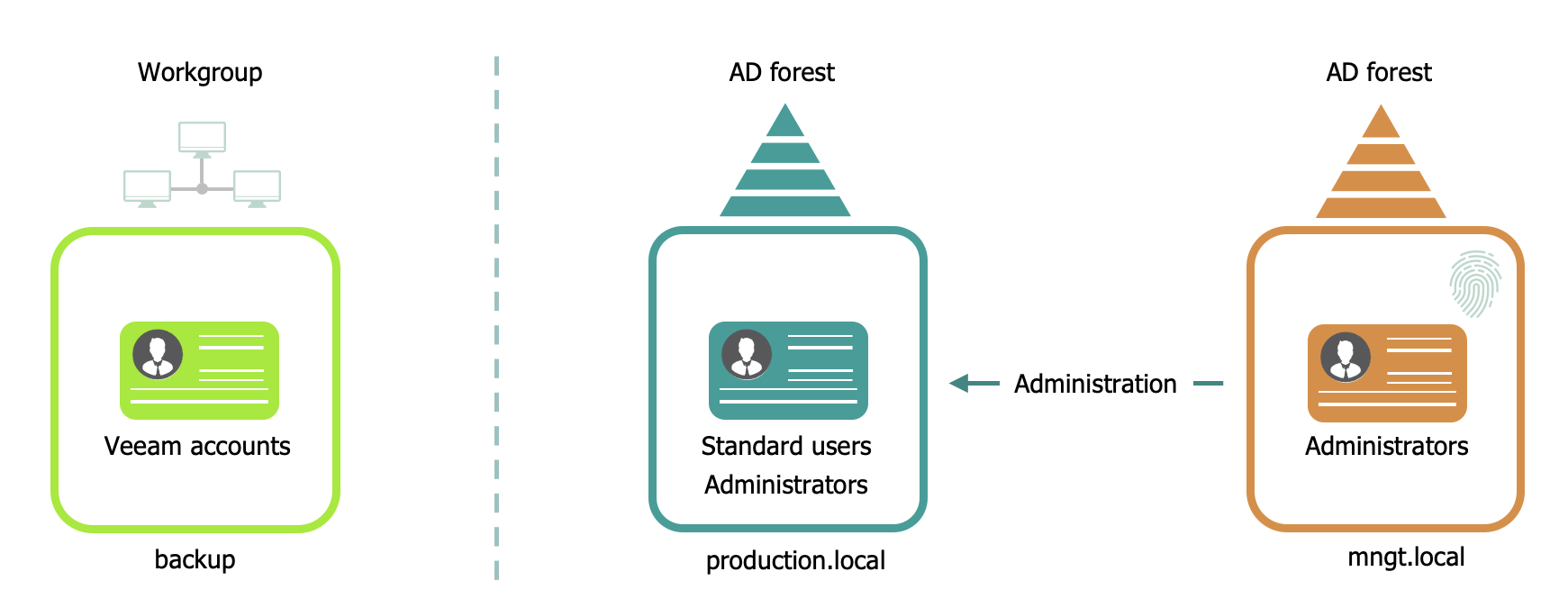
When securing administrative accounts and the Veeam infrastructure installation, the options rank from most to least secure:
- Add the Veeam components to a management domain in a separate Active Directory Forest, with administrative accounts protected by two-factor authentication.
- Add the Veeam components to a separate workgroup, on a separate network where applicable.
- Add the Veeam components to the production domain. This option is never acceptable - there is no environment or constraint that justifies it. If you’re here, treat it as an incident to remediate, not a configuration to document.
Best Practice
For the most secure deployment, add Veeam components to a management workgroup or a management domain in a separate Active Directory Forest, with administrative accounts protected by two-factor authentication. This way the Veeam infrastructure does not rely on the environment it is meant to protect.
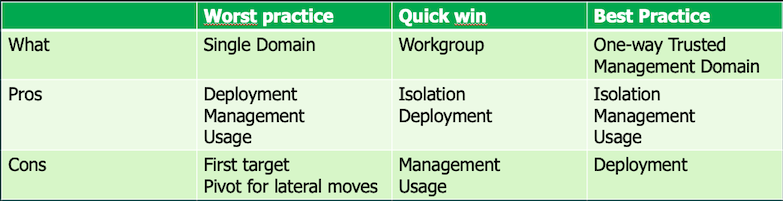
Windows Workgroup
When using a Workgroup, everything needs to be carefully documented for management and compliance reasons. Every system is configured independently: local security policy, local accounts, local permissions. In larger environments with multiple Veeam servers, this becomes cumbersome fast. Kerberos authentication is not available on a workgroup server - NTLM is used instead.
A Workgroup is harder to defend against insider threats: accounts are local, so there’s no single AD account to disable to lock out a specific employee from the infrastructure. It’s also harder to prove compliance, since there’s no centralized audit trail.
Pros
- Fast and easy to set up
- Separates Veeam accounts from domain privileged accounts (helps against keyloggers and production domain breaches)
- Does not rely on the environment it is meant to protect
- No additional infrastructure required (no Domain Controllers, NTP, DNS)
Cons
- Large management overhead in larger environments
- No Kerberos - NTLM only
- Harder to prove and maintain compliance
- No gMSA authentication for guest interaction during backups
A Workgroup setup is a good fit for small environments.
Management Domain
Adding a forest to the Active Directory environment costs infrastructure and setup complexity, but the fixed design and small footprint keep it manageable. Centralized policies, user rights, and permissions make administration easier, including one-click deactivation of a single AD account when facing an inside threat.
Pros
- Easy to manage
- One-click deactivation of a single AD account
- Does not rely on the environment it is meant to protect
- Secure Kerberos communication between Veeam components
- Group Policies for enforceable, auditable configuration baselines
Cons
- Requires extra infrastructure components
- Needs AD expertise to set up correctly
- Kerberos beats NTLM but isn’t immune: service accounts remain exposed to Kerberoasting (MITRE ATT&CK T1558.003) - any authenticated domain account can request a service ticket and crack it offline to recover the account’s password. Mitigate by enforcing strong Kerberos encryption and disabling RC4 for password changes - see Kerberos Authentication.
Veeam 13 removes this exposure for Veeam-to-Veeam communication. Components deployed via the Veeam Infrastructure Appliance (proxies, repositories, gateways) pair with the backup server through a pairing code and authenticate using certificates - no username, password, or Kerberos ticket involved. See Adding Veeam Infrastructure Appliance. Windows components can use certificate-based authentication too, via the Veeam Deployment Kit.
What Type of Trust?
Forest trusts help manage a segmented Active Directory infrastructure and support access to resources across multiple forests. They let you link two forests with a one-way or two-way transitive trust relationship.
Trusts Overview
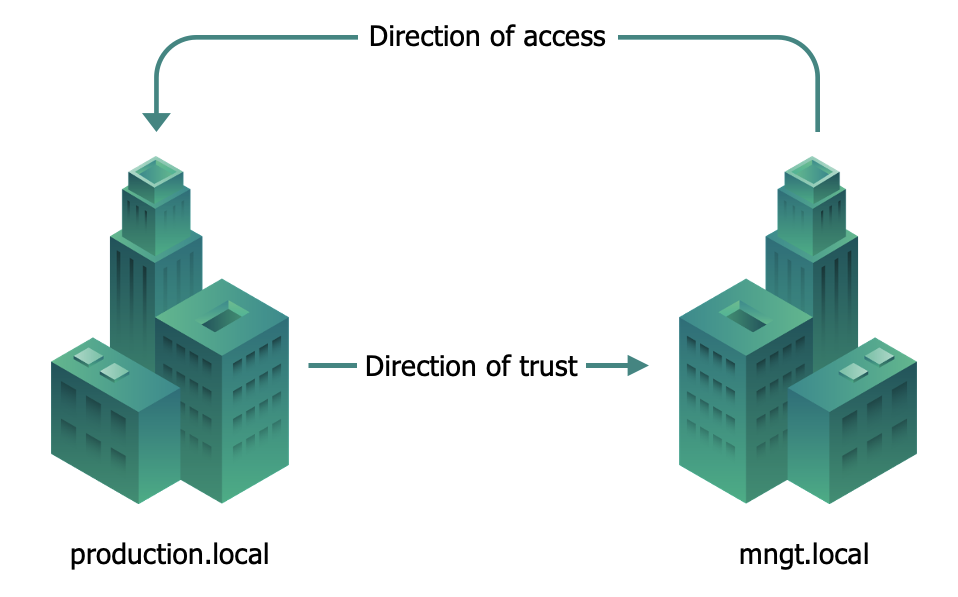
If a one-way forest trust is created, members of the trusted forest can access resources in the trusting forest - but only in that direction. For the management domain, this means production trusts the management domain, giving Veeam administrators access to production for backup and restore operations, while a compromise of production grants no path back into the management domain or the backup infrastructure behind it.
Applicability
This applies to Windows-based Veeam deployments. The Veeam Software Appliance (see Attack Surface Reduction) uses local accounts by design and doesn’t join a domain - the isolation described here is built into the platform choice for VSA deployments.
References
- MITRE ATT&CK T1558.003 - Kerberoasting
- Kerberos authentication overview in Windows Server - Microsoft Learn
- Kerberos Authentication - Veeam Backup & Replication User Guide, includes Kerberoasting mitigation guidance
- Adding Veeam Infrastructure Appliance - certificate-based pairing for VIA/VSA components
- Using Veeam Deployment Kit - certificate-based authentication for Windows-based managed servers and agents
- KB4469 - Impact of removing VBR from an Active Directory domain
- NIST SP 800-207 - Zero Trust Architecture