Veeam Recovery Orchestrator Knowledge Base
Veeam Clean Room best practices
Concept
Veeam Clean Room is designed to be a safe place to store and test backups, and a trusted source for clean recovery of workloads while having infected and compromised production environments.
The following is the reference architecture:
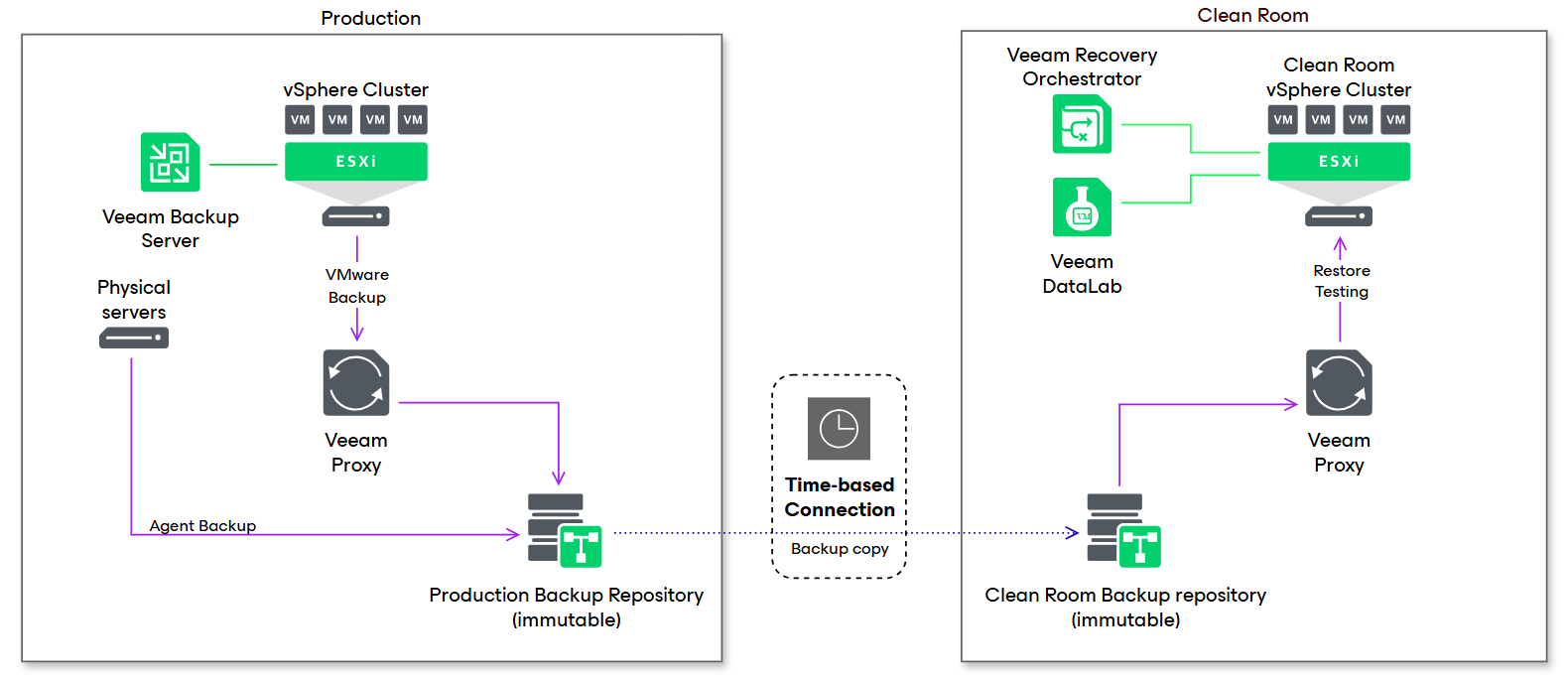
Between the Clean Room and the production environment is the network equipment, which controls the isolation and allows limited time connection to transfer backup copies to the Clean Room.
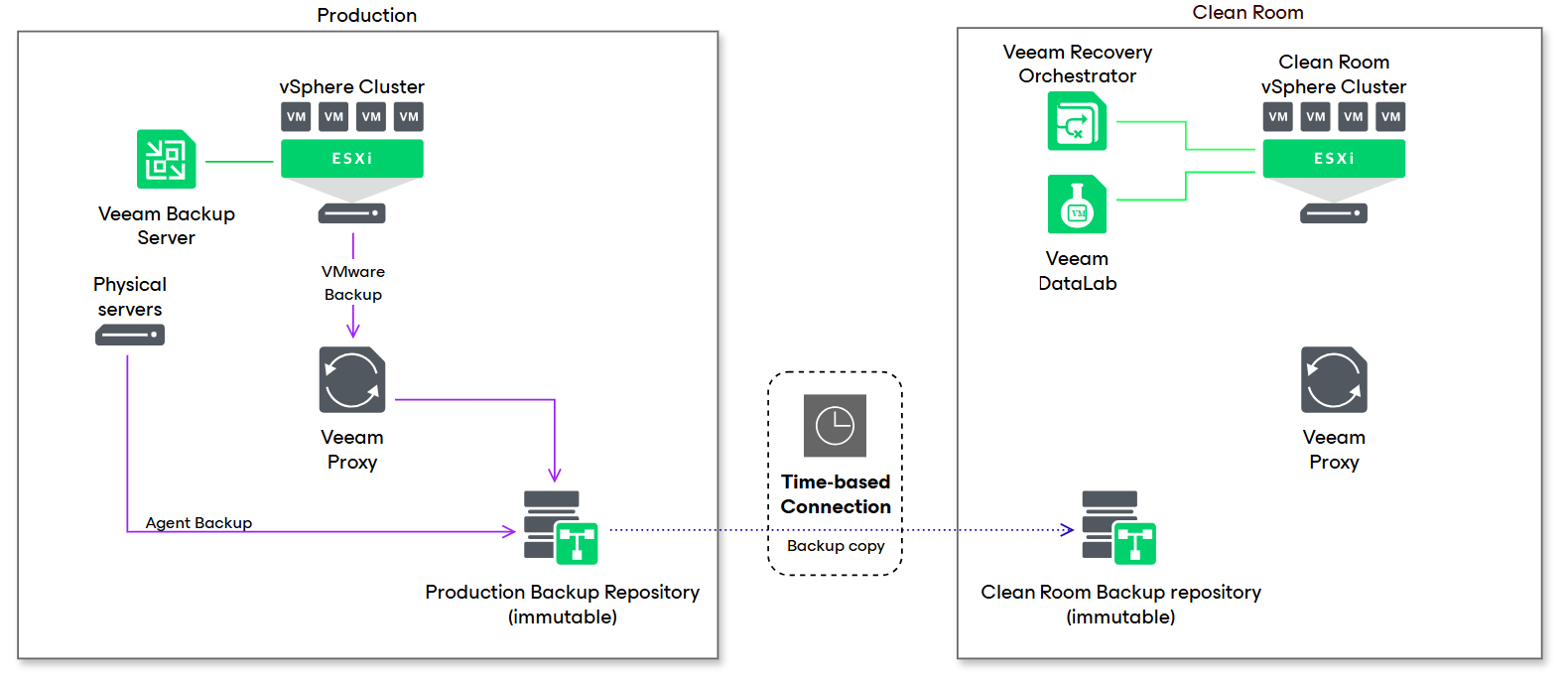
Open Connection Phase
During the open connection phase, the backup repository in the clean room is attached and accessed by the production Veeam Backup & Replication (VBR) server.
Close Connection Phase
Once the connection is closed down and the production VBR no longer has access to the repository, the embedded VBR inside the Orchestrator connects to the repository, imports the backups and then restore/testing activities may take place.
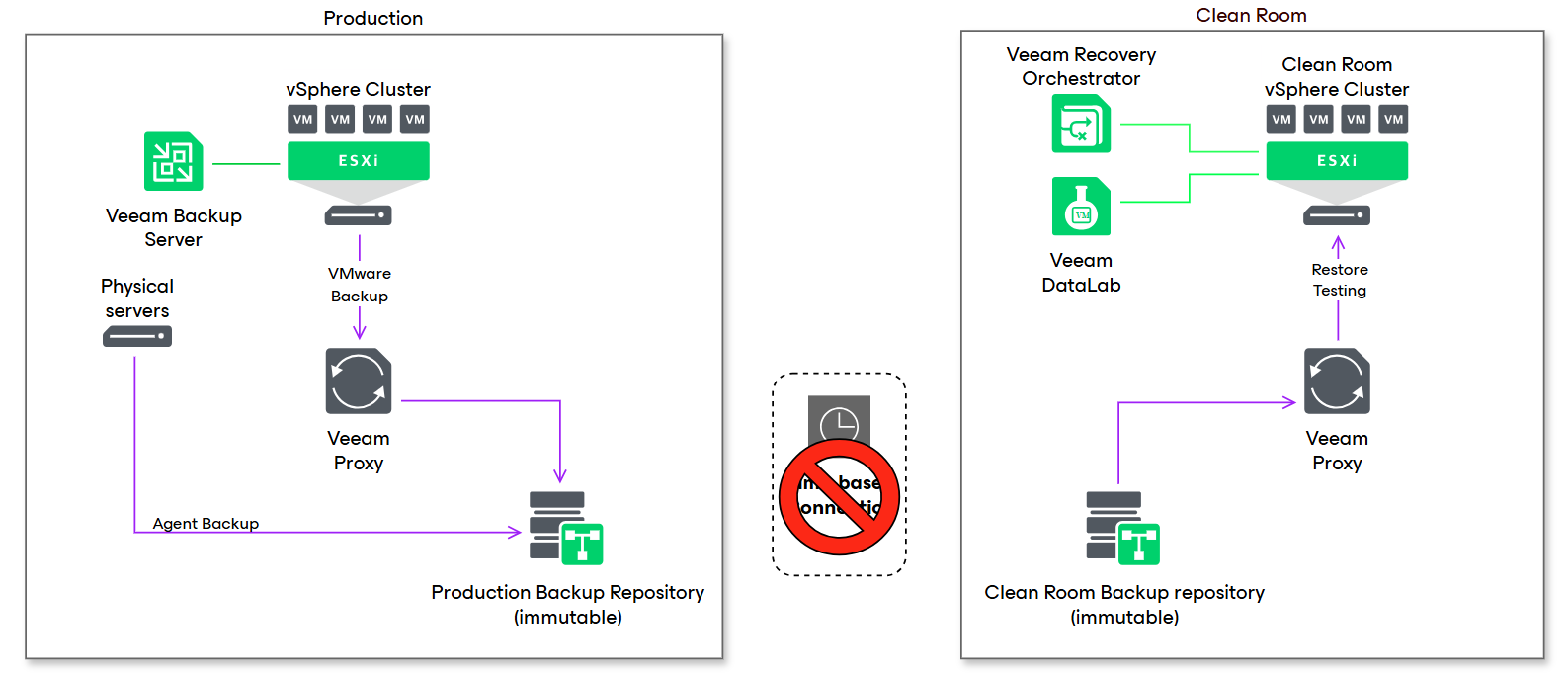
Before the connection is opened again to sync the latest backup copies, the clean room repository is disconnected from the embedded VBR server so the production VBR can safely access data again.
The Veeam Clean Room architecture is flexible and can change according to the requirements, allowing for more repository types and methods of backup data replication.
For a video demo of the Veeam Clean Room, head to the From the Architect VRO Clean Room website.
Supported workloads
Veeam Clean Room supports vSphere and Hyper-V backups.
Agent backups and NAS backups are not supported yet but a workaround exists.
Nutanix and KVM based backup are not supported yet.
Check the Scripts and Snippets page for workarounds examples.
Requirements and Recommendations
- The current release of Veeam Recovery Orchestrator (v 13.0.1) requires at minimum an initial connection to the production vCenter to gather inventory and create restore plans using vSphere tags.
Connection to the production VBR is optional and only required to create restore plans based on backup jobs.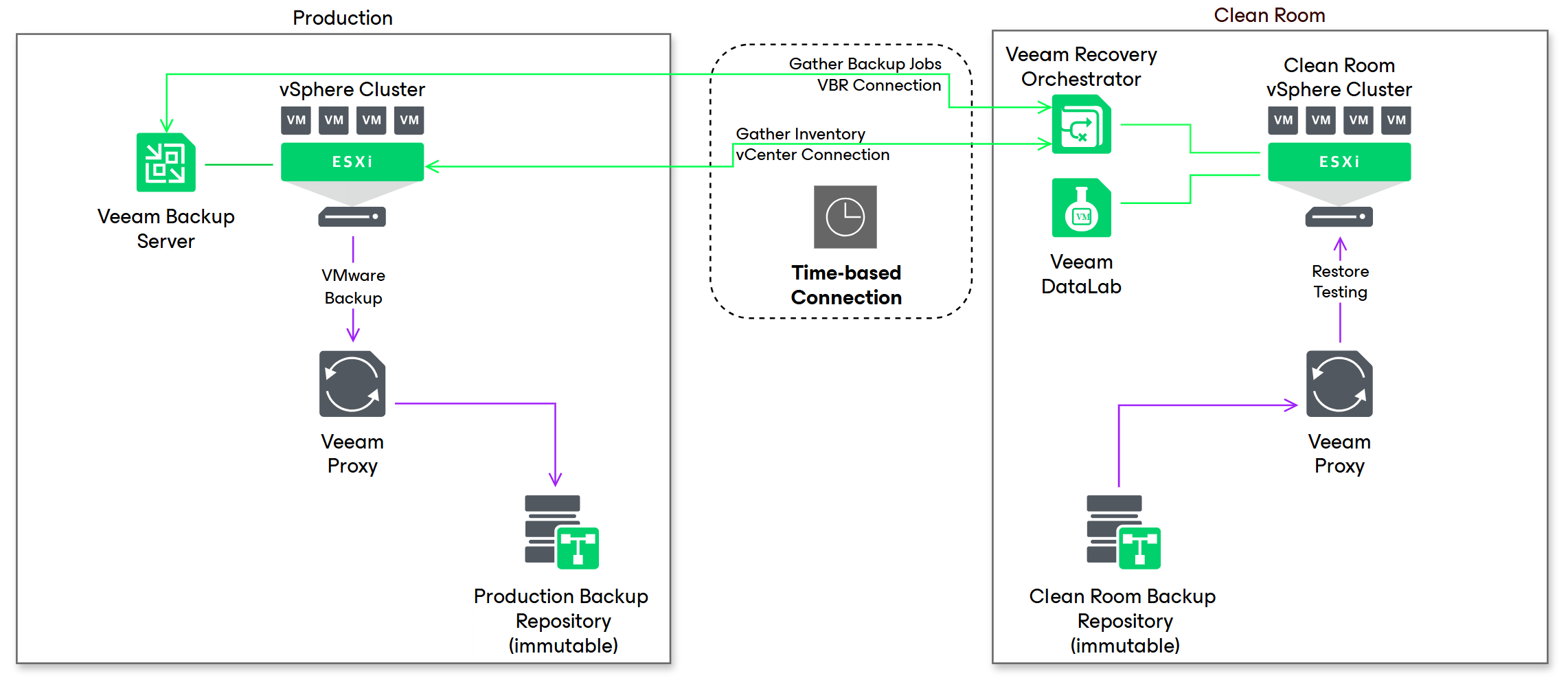
- The backup repository should never be simultaneously accessed by both the production and clean room: this is not supported and may lead to data corruption.
There are Object Storage S3 compatible repositories solutions which allow simultaneous access by providing the VBR in the Clean Room limited read-only access to the bucket. - Veeam Hardened Repositories deployed via the Veeam Infrastructure Appliance ISO are not currently supported.
- Repositories with immutability are strongly recommended to make sure data is safer from any corruption/modification even in the event of concurrent access.
- Multiple smaller repositories with shorter retention are recommended to have faster rescan times during the import of the repository in the clean room.
- Repositories based on deduplication appliances (like HPE StoreOnce or Dell Data Domain) are supported but not recommended. Rehydration of data has a performance impact and will slow down the import of backup data and backup testing.
- If you want to use Veeam Threat Hunter to scan backup data, it needs to be enabled on the embedded VBR in the VRO server: an internet connection is required for activation and to download the latest signatures. The use of a proxy is supported; more information on this topic can be found on the VRO Malware Scan page.
- In case of Linux Hardened Repositories, the Linux server hosting the repository must be added in advance to the inventory of the embedded VBR server.
- After attaching a repository to the embedded VBR server, a 10 minutes wait before any activity is recommended. It ensures the Orchestrator has time to collect information about the backups and restore points from VBR.
- Network isolation - the isolation of the environment can be controlled through various methods, which can be categorized into two main approaches:
-
Fixed
To implement a fixed schedule, dedicated network interfaces in the servers within the clean room environment can be configured to automatically connect and disconnect from production at specific times. This can be achieved using cron jobs or scheduled tasks.
Another way we recommend is to manage the network switches’ ports, which requires the network team’s support to create the appropriate schedule. -
Dynamic
Dynamic control introduces complexity as it requires a script to poll the production VBR and check the status of backup copies during the active connection window. Once the backup copies are successfully completed, the script can issue commands to close the connection, following the same procedures outlined in the fixed schedule.
-
Implementation
WARNING
Every example in this page is provided “as is” and meant as a starting point for further customization and refinement.
Please carefully review each line to understand the scripts’ functionality and avoid executing them without comprehension.
Attach Linux Hardened Repository
During isolation, the backup copy repository is attached to the embedded VBR in the Clean Room and a rescan must be performed to get the latest restore points. The following is an example of Powershell script that connects the repository as “SecondaryRepository”.
It may be executed either at the initiation of the close connection window or as a pre-planning step within a Restore Plan in the Orchestrator.
Prerequisites and notes:
- As mentioned in the requirements, the Linux server hosting the repository must be added in advance to the embedded VBR configuration as a one time activity. Keeping the server registered is safe and removing it after use is not required.
- The server name must be added as $ServerName.
- Please also note the path of the Veeam repository in the server: it needs to be defined as $PathToRepository (for example “/veeam”).
- The script include a 10 minutes sleep (see above).
# add_repository.ps1
$ServerName = ""
$PathToRepository = ""
$RepositoryName = "SecondaryRepository"

$repository = Get-VBRBackupRepository -Name $RepositoryName
if (!$repository)
{
$vhr2server = Get-VBRServer -Name $ServerName
$repository = Add-VBRBackupRepository -Folder $PathToRepository -Type Hardened -Name $RepositoryName -Server $vhr2server -EnableBackupImmutability -ImmutabilityPeriod 7
Sync-VBRBackupRepository -Repository $repository
Start-Sleep 600
}
Detach Linux Hardened Repository
Before opening the connection again to production and resume backup copies, it’s required to detach the repository in the clean room. The example script is very simple, and disconnects the repository by the name “SecondaryRepository”.
# remove-repository.ps1
Remove-VBRBackupRepository -Repository "SecondaryRepository" -Confirm:$false
Implementation S3 Compatible Object Storage
If a read-only policy is applied to the user connecting to the S3 bucket, it’s enough to perform a rescan at the start of the close connection window.
# resync_s3repository.ps1
$RepositoryName = "S3Repository"
$repository = Get-VBRBackupRepository -Name $RepositoryName
Sync-VBRBackupRepository -Repository $repository
Start-Sleep 600
Other repositories
The same concepts apply to other repositories: if no read-only capability exist, the repository must be disconnected so there is no concurrent access from production and embedded VBR.
Otherwise, performing a simple rescan is enough.
Please refer to PowerShell Reference for more commands to connect or disconnect specific repositories.
Other scenarios
External Storage FC Snapshot/Storage replication
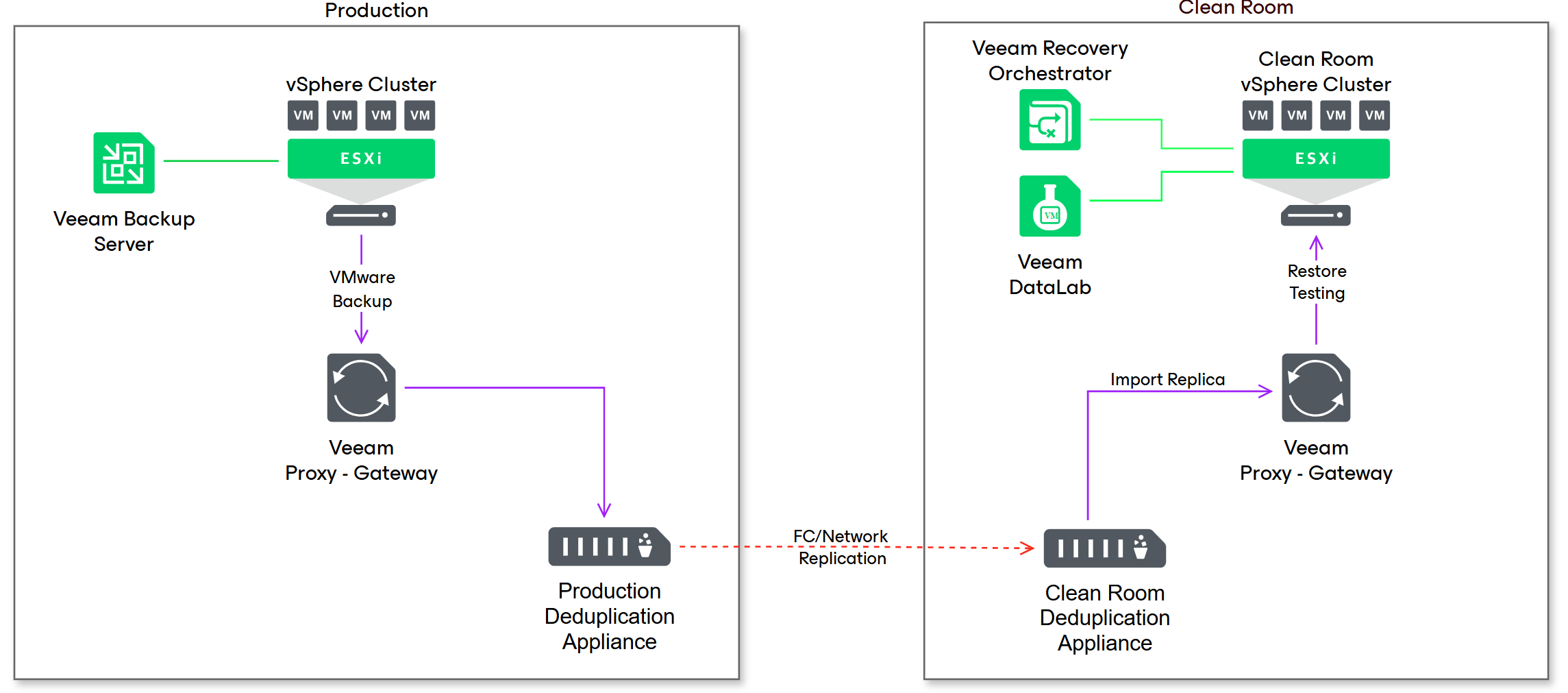
Deviating from the reference design, this scenario is for repositories backed by external storage systems, using storage snapshots or storage replication. It provides stronger isolation leveraging a copy of backup data using fiber channel connections instead of network.
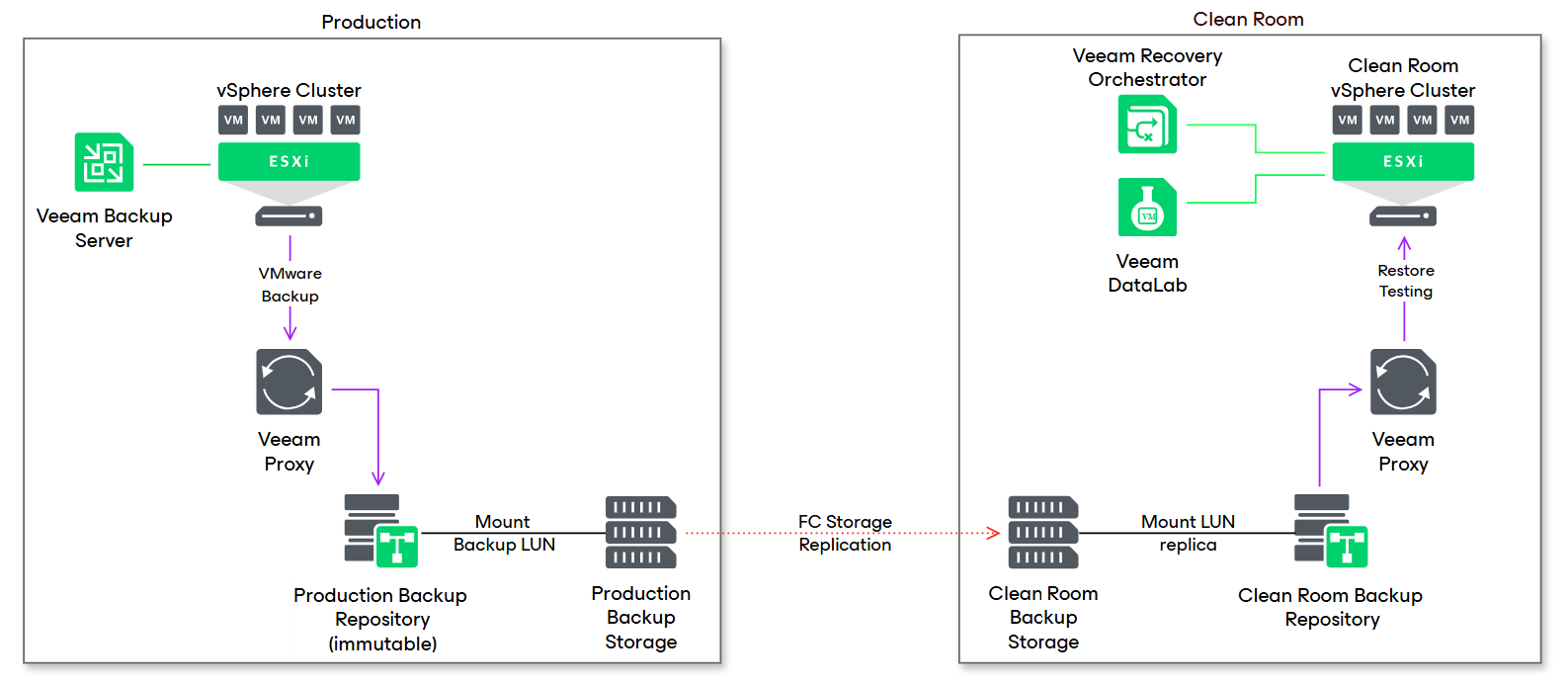
This case assumes the production backup repository is a Veeam Hardened Repository with immutability, so a dedicated Linux server in the clean room has been installed to mount the backup LUN/snapshot from the external storage.
Additional commands are required to present the LUN/snapshot to the Linux server in the clean room, and to mount the LUN/snapshot to the backup mount point in the Linux server.
The rest of the procedure is the same as the Veeam Hardened Repository.
This scenario doesn’t require any special care as there is no risk of concurrency between production and embedded VBR.
Deduplication Appliance and other systems replication
Other systems, including deduplication appliances, have their own data replication which may be based either on FC or network connection.
Depending on the system, it may be just enough to rescan the contents of the replica, or to detach and reattach the repository.