


Veeam Recovery Orchestrator Knowledge Base
Sizing recommendations
Veeam Recovery Orchestrator server’s internal structure consists of several key components.
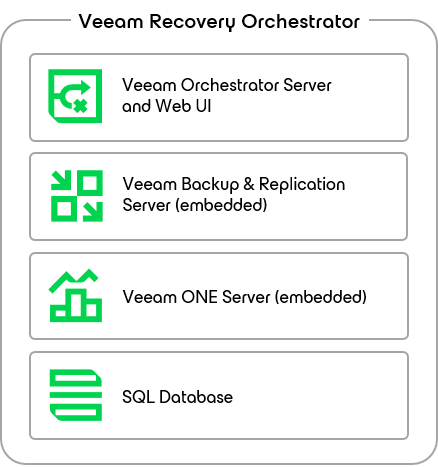
These components have each their own requirements and the overall sizing depends on how the Orchestrator will be used.
Specifically, there are 2 cases that dictates sizing:
- VRO is used strictly for orchestration only, and production backup servers are responsible for performing recovery. In this case please refer to the Hardware Recommendation table found here.
- VRO is used in contexts where the production backup servers are not available, for example in DR scenarios where the VBR is lost, or in isolated environments. In this case the recovery is performed using the embedded VBR server, meaning operations at scale need more resources, specifically:
- proxy servers for standard recovery
- mount servers for instant VM recovery
In addition to the standard sizing following the help center, careful consideration should be placed on the restore requirements, evaluating not just CPU and Memory but also the necessary throughput and network bandwidth.
Therefore, the embedded VBR server should be sized in a similar way to the production VBR, minus the resources required for backups, meaning an all-in-one deployment may not be enough.
Additional external servers may need to be added to the embedded VBR infrastructure as proxy servers and mount servers, so they will be automatically used by the Orchestrator as soon as they are needed.
Please refer to the Veeam Best Practice Guide for proxy servers sizing.
Testing in isolated environments
Similar concepts apply to restore plan testing in isolated environments.
Administrators can choose whether to perform a full restore or instant vm recovery during plan testing; the resources used with these tasks will be embedded VRB proxies and mount servers, respectively.
Mount servers are additionally used to perform malware scanning, so if several concurrent operations are required the amount of mount servers associated with backup repositories should be configured accordingly.
A single mount server can be configured per repository, so when running many instant recoveries or malware scans concurrently it’s recommended to have more repositories, each mapped to a separate mount server.
Please refer to the helpcenter for recommendations on how to size each mount server.
Repository sizing with the embedded VBR
Veeam Backup & Replication does not currently support concurrent access of multiple backup servers to the same repository, meaning in a DR scenario (when the production VBR is offline) or in isolated environments (when the connection to production is off) the repository should be attached to the embedded VBR and a rescan should be performed to make use of the backup data.
The rescan procedure may take anywhere from a few minutes/hours to several days to complete, depending on several factors. If use of repositories in DR connected to the embedded VBR is planned, you should consider having multiple, smaller repositories, possibly with a short retention avoiding long GFS chains.
Performance of the repository has a strong impact, so avoid deduplication appliances and low IOPS storage repositories.
This will help speed up the rescan times, therefore lowering your overall RTO.