


Veeam Backup & Replication Best Practice Guide
Introduction
The ABR is a new role that can only be enabled on a VIA deployed Hardened Repository. It leverages ZFS pools and ZFS datasets exposed as NFS shares. Retention is defined at the repository level and leverages immutable ZFS snapshots. Backup copies and Tape offloads are possible.
Best Practices
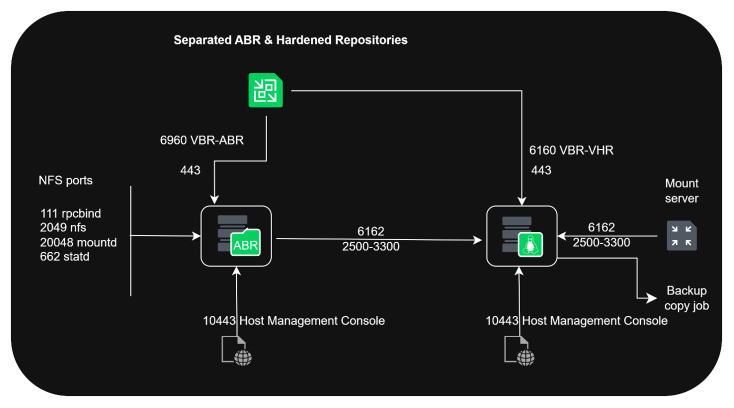
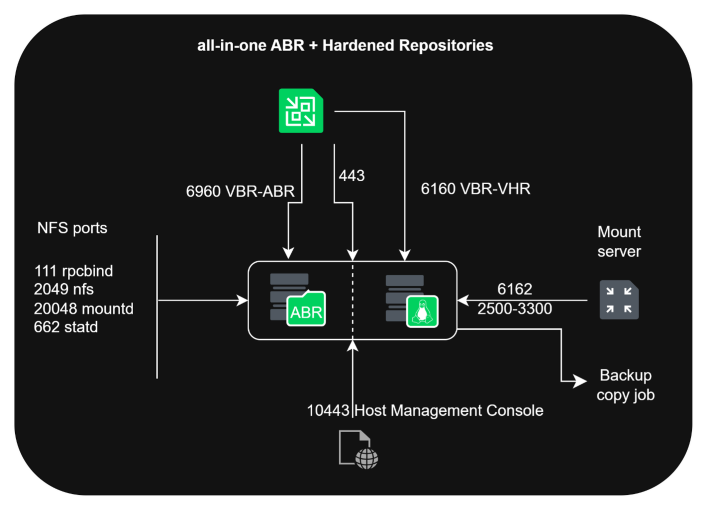
- Avoid running both VHR and ABR roles on the same server. ABR requires additional ports to be opened (for NFS sharing) and augments the attack surface of a VHR.
- Create 1 ABR share per Application since retention is defined at the repository level.
- Do not create backup copy jobs with a schedule over 90 days between restore points. CBT is handled internally by ZFS bookmarks (i.e. ZFS snapshots CBT) that auto-expire after 90 days.
Deployment
- Deploy single-disk VIA Hardened Repositories (unless you want both VHR and ABR functionalities – not recommended).
- Attach storage(s) after the VHR is deployed and configure the ABR volume(s). Note that externally attached storage (iSCSI and FC) is currently unsupported.
- It is not necessary to add the new VIA as a VHR repository to be able to add it as the ABR repository. In fact, if the VHR repository has been added by mistake, it is best practice to remove it.
Architecture
- Preferred architecture separates ABR and VHR.
- All-in-one “ABR/VHR” exposes more ports and augments surface of attack.
Performance considerations
Evaluate application SLA requirement and match appropriate storage tier (i.e. SSD-based ABR volumes, Disk-based ABR volumes, etc.).
Removal considerations
VBR tags the ZFS snapshots with a ZFS hold and controls when it gets removed. If you decide to remove an ABR repository from VBR it is best do it after the immutability period has passed for all snapshots else they cannot be deleted even if you enable shell access.