


Veeam Service Providers Best Practice Site
Design
In this section we will provide blueprint designs for each of the suggested Disaster Recovery scenarios:
- Cloud Connect DR = between the customer site(s) and the service provider site(s)
- Site-to-Site DR = between service provider (IaaS) or customers sites
- Azure DR = between service provider (IaaS) or customers sites and Microsoft Azure
Cloud Connect DR
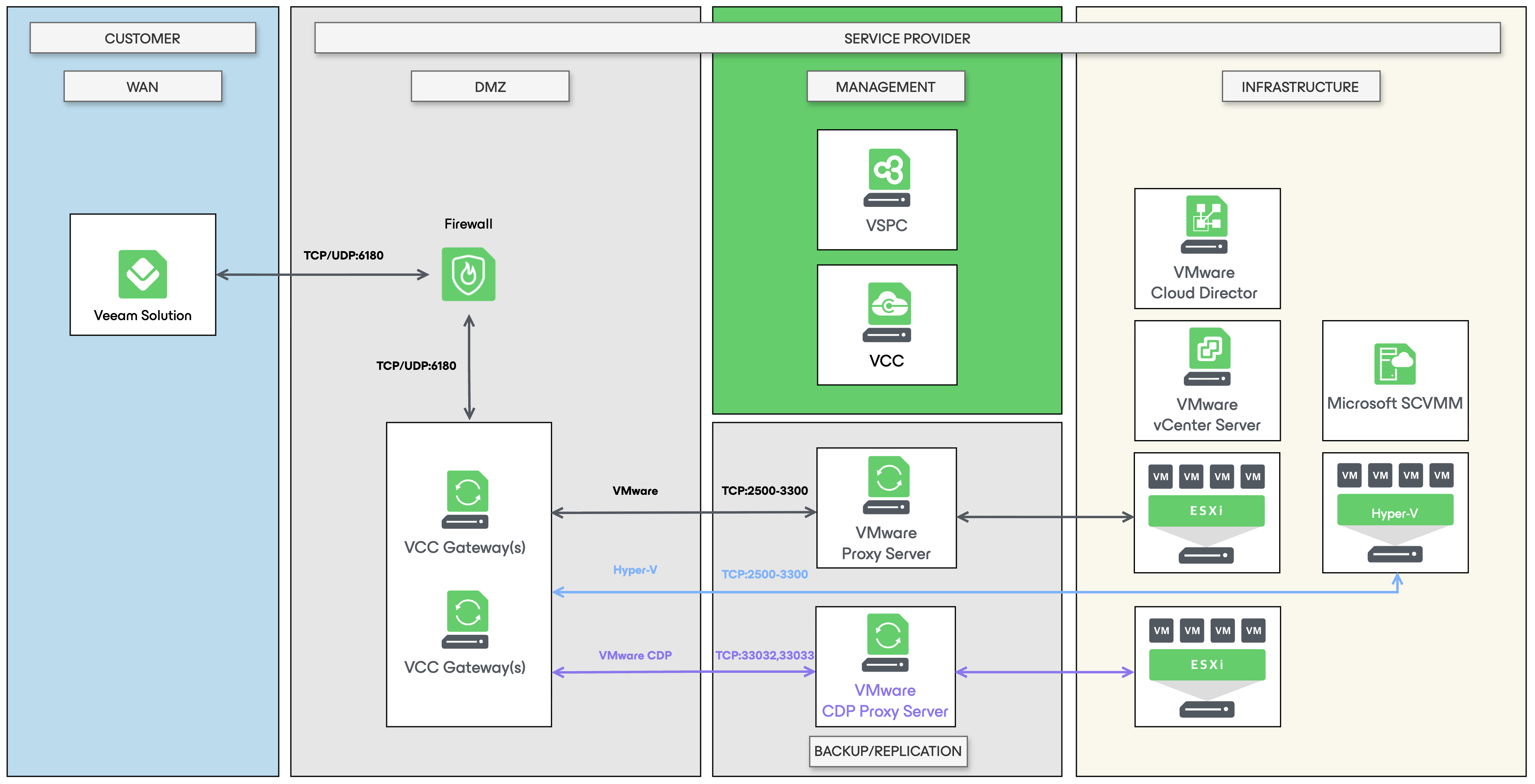
This specific scenario is generally used when a customer does not have any DR site available. The Service Provider will provide a multitenant DR site the customer can consume. The deployment consists of the following components:
Customer site
- Veeam Backup & Replication
- Veeam Agents
- Network infrastructure: Veeam Network Extension Appliance (NEA), NSX Edge, VPN, other in case of partial site failover
- Backend infrastructure: firewall, DNS, Domain etc.
Service Provider site
- Veeam Cloud Connect
- Veeam Service Provider Console
- Network infrastructure: NEA, NSX Edge, VPN, other in case of (partial / full site) failover
- Backend infrastructure: firewall, DNS, Domain etc.
In addition, for a fully managed service it is recommended to deploy the MSP Production deployment for streamlined billing and tenant onboarding.
High-level diagram
This diagram only highlights the core components and the security zones in which they should be deployed. For a full list of ports and diagram, refer to the following sections in the official User Guide:
- Ports in Snapshot-Based Replication Scenarios
- Ports in CDP Scenarios
- Ports in Universal CDP Scenarios
Site-to-Site DR
This specific scenario is generally used in these situations:
- The Service Provider is offering IaaS with an option to provide DR to the production environment.
- The Customer has their own data center locations (sites) and will use a remote site to provide DR to the production site.
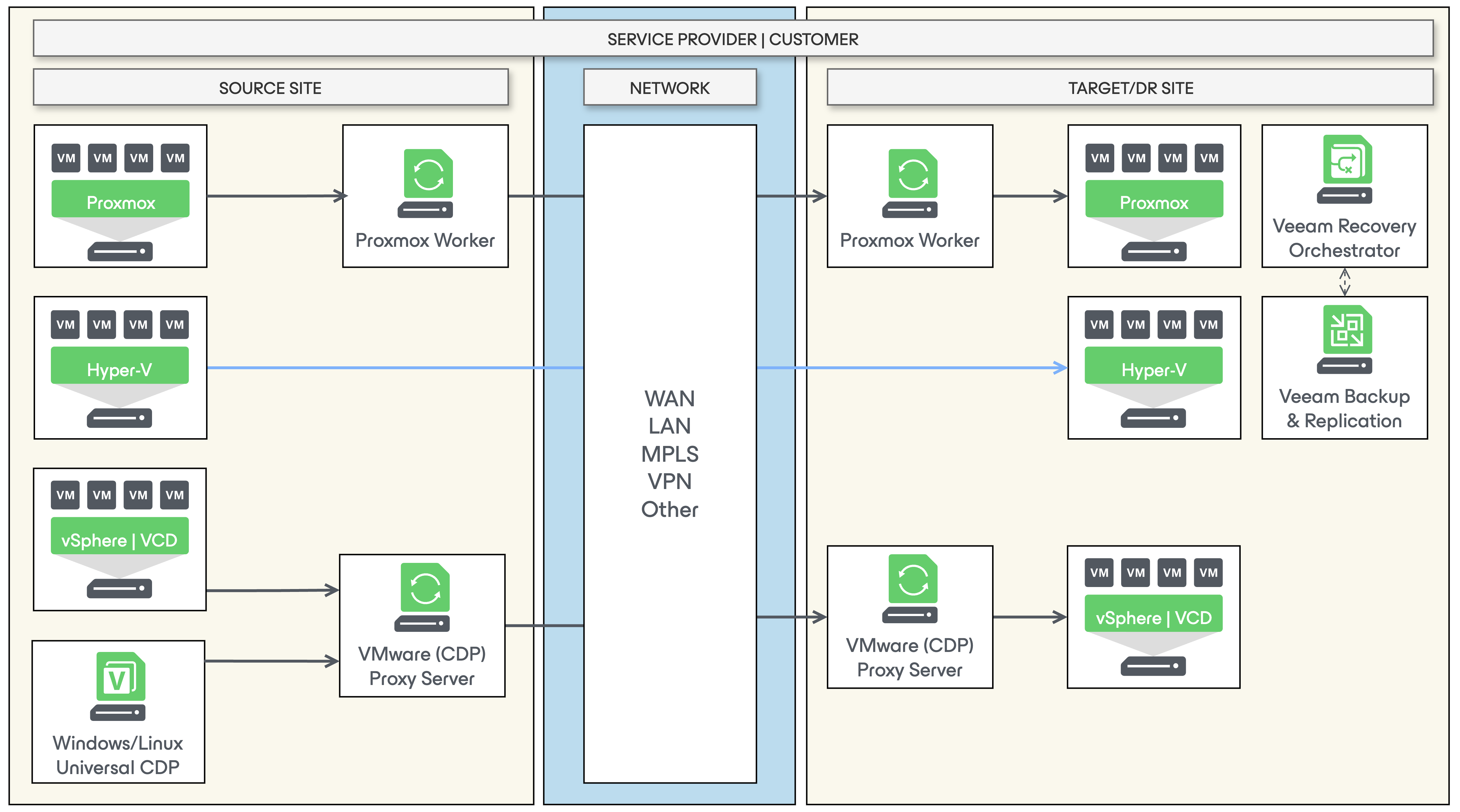
These sites can either be active-active or active-passive. In case of active-active, they will be each other’s DR site. The deployment consists of the following components:
Source Site
- Hypervisor infrastructure: VMware, Hyper-V or Proxmox
- Network infrastructure: NSX Edge, VPN, other in case of partial site failover
- Backend infrastructure: firewall, DNS, Domain etc.
Target/DR Site
- Veeam Backup & Replication
- Veeam Recovery Orchestrator (optional)
- Veeam Cloud Connect (optional)
- Network infrastructure: NSX Edge, VPN, other in case of partial site failover
- Backend infrastructure: firewall, DNS, Domain etc.
High-level diagram
This diagram only highlights the core components and the security zones in which they should be deployed. For a full list of ports, refer to the following sections in the official User Guide:
- Ports for all Direct Scenarios
- Ports in Proxmox Workers
- For the scenario where Veeam Cloud Connect is used, check the section above under Cloud Connect DR.
Azure DR
This specific scenario is generally used when a DR site is not available or it is preferred to use the public cloud instead.
The deployment consists of the following components:
Source Site
- Hypervisor or Physical infrastructure: Any supported hypervisor or workload
- Network infrastructure: NSX Edge, VPN, other in case of partial site failover
- Backend infrastructure: firewall, DNS, Domain etc.
Target/DR Site
- Veeam Backup & Replication
- Veeam Recovery Orchestrator (optional)
- Veeam Backup for Microsoft Azure
This scenario is fully described in whitepaper Azure Instant Recovery DR Runbook and we recommend you to read it for all latest best practices related to DR and Microsoft Azure.
More information on supported workloads and considerations can be found in the User Guide.